Which block needs watering? Was that treatment recorded? Where did this week’s money go? AgroTrack brings your crop records, farm costs and field work together, so you can answer with records instead of chasing messages.
For vegetable growers, horticulture farms, nurseries and planters.
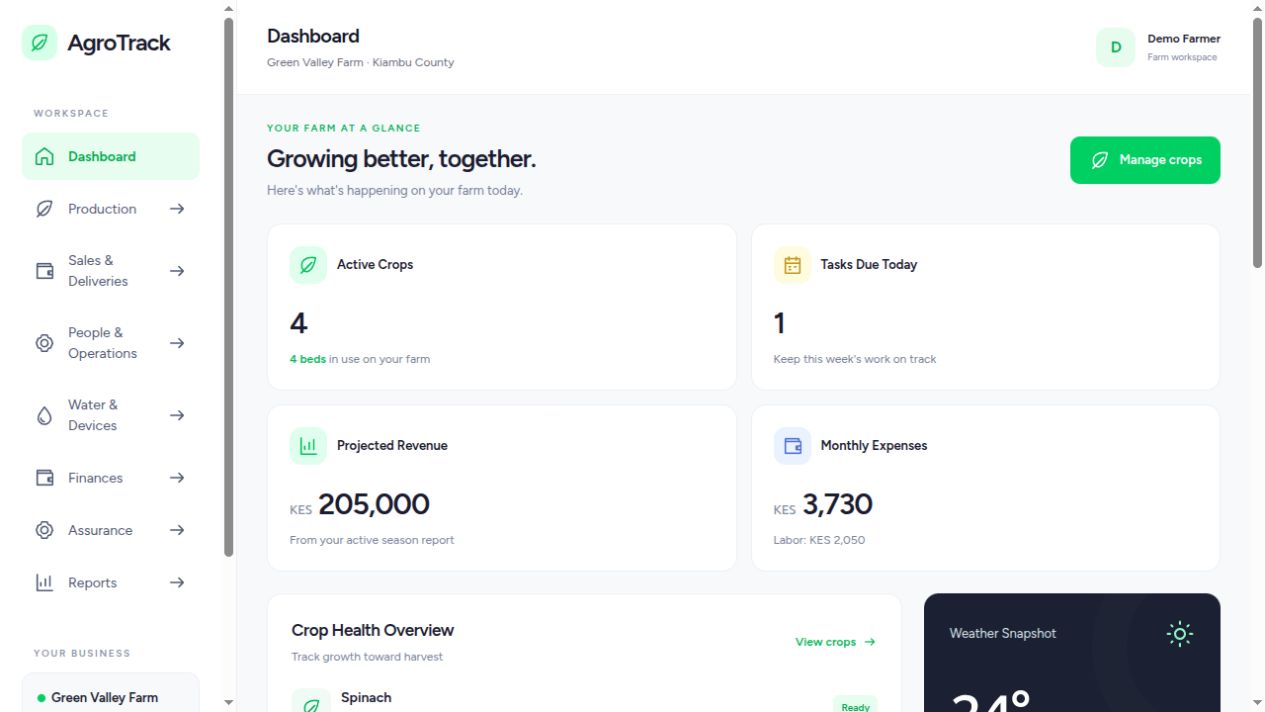
Dashboard overviewDEMO WORKSPACE
See your crops, tasks and costs together.
THE QUESTIONS THAT FOLLOW YOU HOME
Hard work should come with a clear record.
You can spend the whole day on the farm and still finish it unsure about the details. Start with the questions you need answered.
“We sold the crop. Did we make money?”
Seedlings, fertilizer, crop protection, casual labor and irrigation all contribute to the cost. Record the entries while the details are fresh, then review costs alongside your production and sales records.
A task in a message is easy to lose. Keep planned work, employee activity and observations together, so your next conversation starts with what was recorded and what still needs attention.
Give each section a place in its parcel and keep the irrigation plan beside the pump run. Where suitable meters are connected, use readings to check actual water use; a timer alone does not measure it.
Bring planting, watering, weeding, fertilizer and treatment history into the crop’s lifecycle. A dated record makes it easier to investigate a problem and decide what your team should check next.
Your farm business can have land in different locations. Organize each parcel and its sections, then keep crops, tasks and production work attached to the right area.
When traceability is enabled, retain the material source, batch, producer and receipt evidence. Nurseries and planters can keep the history of seeds, seedlings and cuttings before they reach the field.
A crop belongs to a growing section. Work and inputs belong to production. Your farm records become more useful when those details stay together.
Production & nursery
Record planting details once, reuse crop templates and follow activities through the season. Keep nursery batches and source evidence connected to the plants.
Land & irrigation
See your growing sections within each parcel. Save an irrigation plan, choose an optional pump timer and review the records alongside crop needs.
People & daily work
Give the team a clear plan and record what happened. Assignments, start and stop times and observations add context to the work behind each crop.
Costs & accountability
Keep input expenses, labor, purchases and stock organized. Review the entries behind a cost total before making decisions about your next season.
SEE THE WORKSPACE
Built around the way you grow.
Actual application screens, shown with demonstration data.
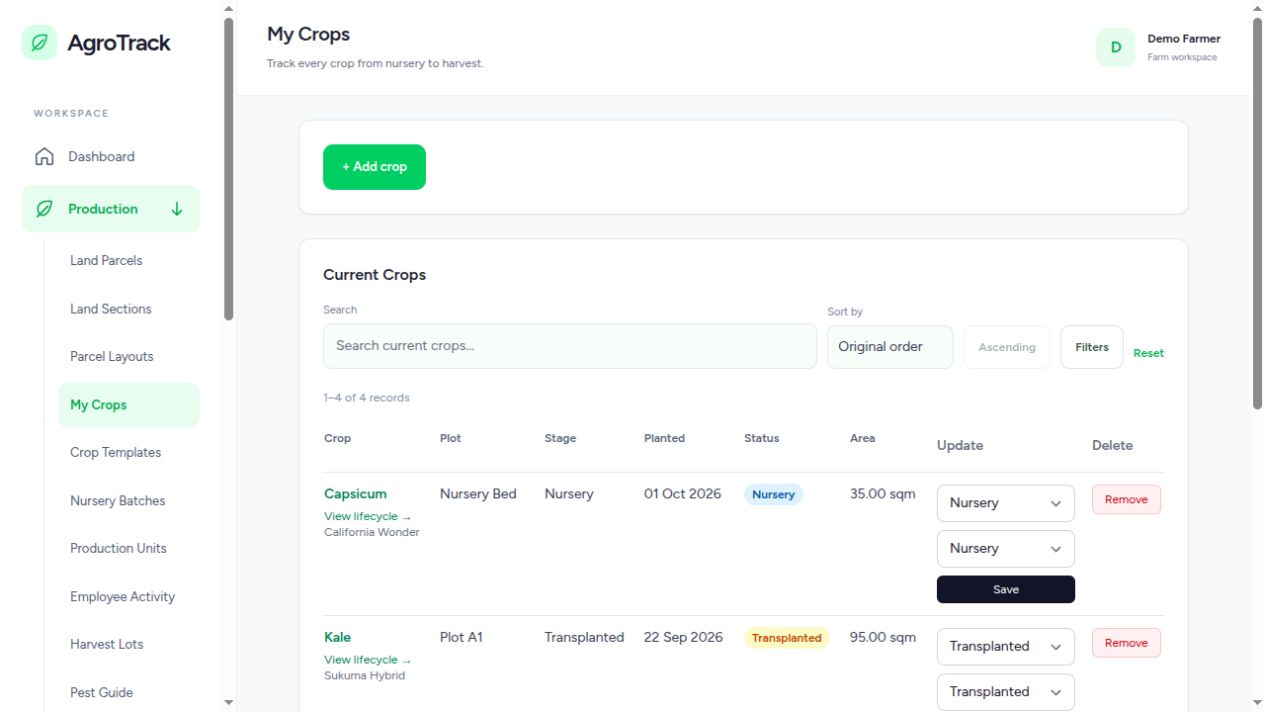
01 / CROP MANAGEMENT
Follow every crop through its lifecycle.
Keep planting details, crop stages and field activities together. Open a crop to review its history, from planting and watering to treatments and harvest.
Reusable crop templates
Optional planting-material traceability
Searchable, sortable crop records
Crop management · Demo data
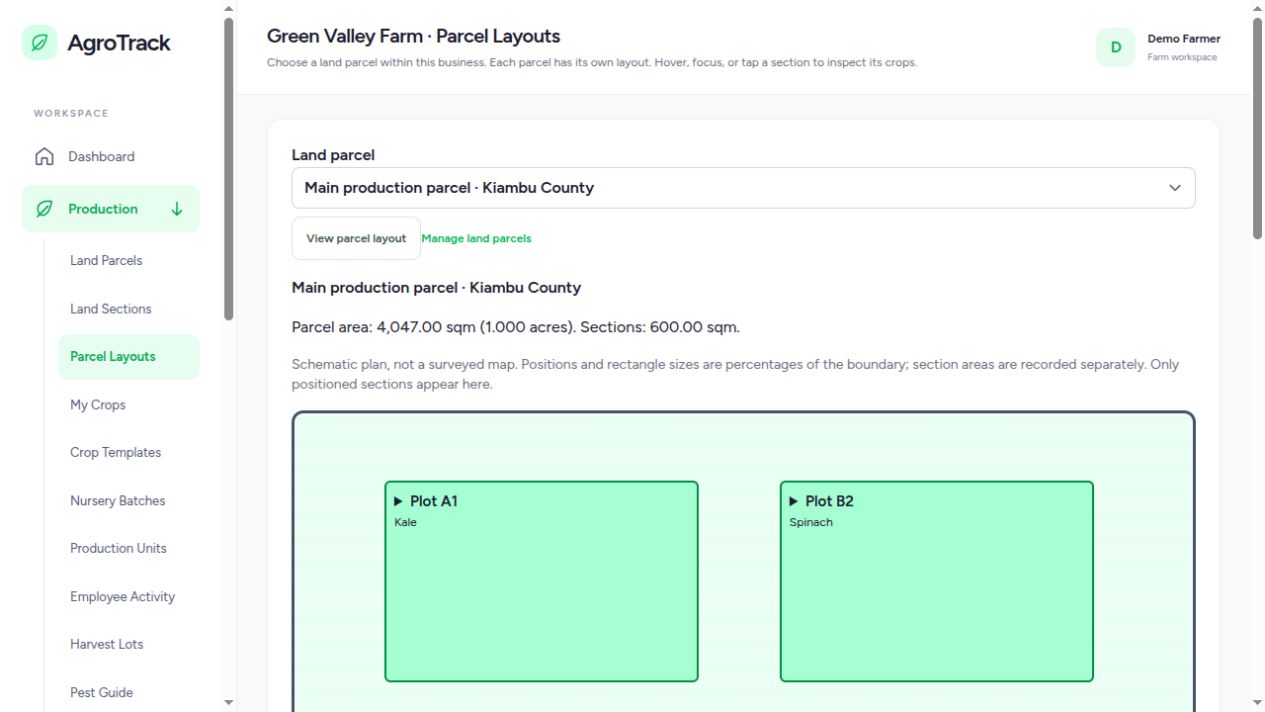
02 / PARCEL LAYOUTS
See the land behind the records.
A farm business can manage several parcels in different locations. Each section belongs to a parcel, keeping your growing areas organized and your records grounded in the right place.
Visual section layouts
Crop information tied to growing areas
Separate parcels within one business
Parcel layout · Demo data
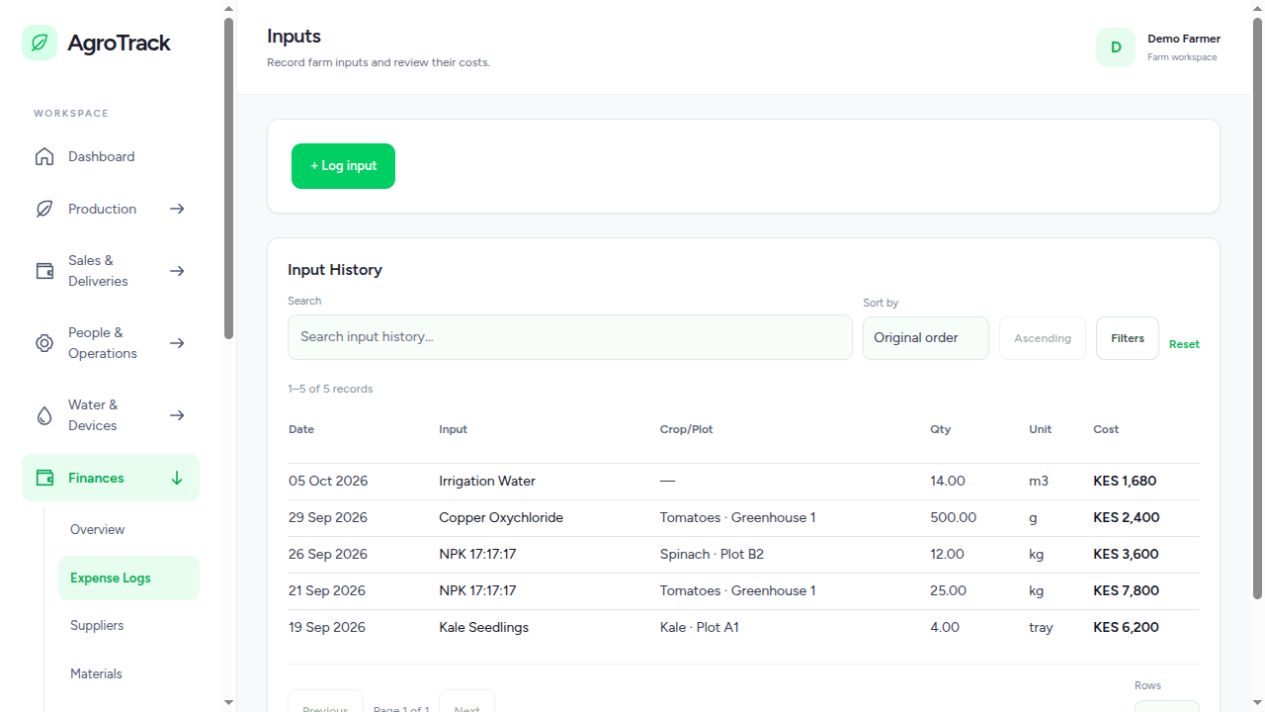
03 / FINANCES
Understand what production costs.
Record your inputs and review spending alongside labor, purchases and inventory. Keep the detail available when you need to understand a crop or season.
Input categories and cost records
Search, sorting and table filters
Connected labor and inventory workflows
Inputs and costs · Demo data
FROM THE MORNING ROUND TO THE WEEKLY REVIEW
Make the record part of the work.
A system is useful when it fits the decisions you already make. Here is one way a growing operation can use the workspace through the day.
01
Plan the morning
Open the dashboard, review crop progress and upcoming tasks, then agree on the sections and activities that need attention. Give assignments to the team.
02
Record in the field
Log crop activities and observations, record an input used, or enter employee work times. Save a draft if you need to check details before submitting.
03
Review the day
Check recorded work against the plan. Review irrigation records and observations. Follow up on gaps while the people who did the work can still explain them.
04
Learn from the season
Bring costs, crop history, harvest and revenue records into the review. Investigate incomplete entries before deciding what to repeat or change next season.
RECORDS WITH A PURPOSE
Turn everyday entries into useful conversations.
Before buying more inputs
Review purchase records, stock movements and recorded use. Check what is available and what has already been allocated to production.
Before the next irrigation run
Review the section, crop requirements and previous irrigation records. Set the intended run time and section plan when needed.
Before accepting a buyer’s requirements
Check source evidence, production history and configured assurance requirements. Identify what still needs review before making a compliance claim.
YOUR WORKSPACE, WHERE YOU WORK
Take it from the office to the field.
The responsive interface works on phones, tablets and desktops. Install it as an app in a supported browser, and save eligible field-form drafts in an open tab when your connection drops.
Account protection with optional two-factor verification
Drafts that help you finish records when you reconnect
Connected pump controls with optional run timers
ONE WORKSPACE, DIFFERENT GROWING OPERATIONS
For the grower, the supervisor and the nursery.
Vegetable and horticulture farms
Follow repeated plantings, field activities, inputs and harvest records. Keep separate growing sections organized, even when several crops are at different stages.
Keep each location under the same farm business, with its own sections and layout. Review work and records in the context of the land where it happened.
Organize batches, source material, production units and employee activities. Retain the references and evidence behind seedlings and propagated plants.
You do not have to digitize every old notebook first.
Start with the operation you are running now. Give the team a manageable routine, then add detail as your records improve.
Add your farm business and land parcels.Create the sections where you grow, with clear names your team recognizes.
Record an active crop or nursery batch.Enter the details you know. Use a crop template or save an incomplete form as a draft.
Log the next activity and cost.A watering, a field observation or an input entry is a useful first step.
Review the records together.Agree who records what and when. Consistent entries are what make the reports useful.
A FEW USEFUL DETAILS
Before you get started.
Will this tell me the exact profit for every crop?
The reports summarize the costs, production and revenue you record. Useful crop-level results need complete entries and appropriate allocations. Missing labor, stock use or sales still need to be checked; the system helps you review the evidence behind the figures.
What can I do when the connection drops?
In an already open eligible field form, you can explicitly save an offline draft in that browser tab. Keep the tab open, reconnect and submit it yourself. Offline drafts are not a downloaded copy of your farm, and pump commands always need a live connection.
Do I need sensors before I can start?
No. You can begin with land, crops, tasks and cost records. Connected sensor and pump functions need their respective devices and configured gateways. MQTT sensor connections need a broker and suitable device setup.
Can my team use the same workspace?
The application supports farm membership and role-based access. Organize workers, teams and assignments, and retain observations with production activities. Agree on a recording routine so that the information reflects the work being done.
Is this only for farmers?
No. The workspace also supports nurseries, planters and horticulture production teams, including nursery batches, production units and employee activities.
Can one business manage several pieces of land?
Yes. Your farm represents the business. Add separate land parcels for its locations, then organize growing sections within each parcel.
Can I operate pumps without choosing a section?
Yes. A section schedule and run timer are optional. Pump operations require a connection and are never queued offline.
Does the system guarantee export compliance?
Export requirements depend on the crop and destination. The system supports traceability, evidence and assurance reviews; requirements must be configured for the markets you serve.
MAKE ROOM FOR BETTER RECORDS
Start with the crops you have today.
Add your land, record an active crop and log the next piece of field work. You can build a useful history one entry at a time.