Crop records
Your crop history should not depend on who remembers.
Farm cost tracking, input records & labor expenses
Seedlings, fertilizer, crop protection, casual labor, irrigation and small purchases can add up quietly. A sales figure is easier to remember than all the costs behind it. Scattered receipts make it difficult to know which records are missing.
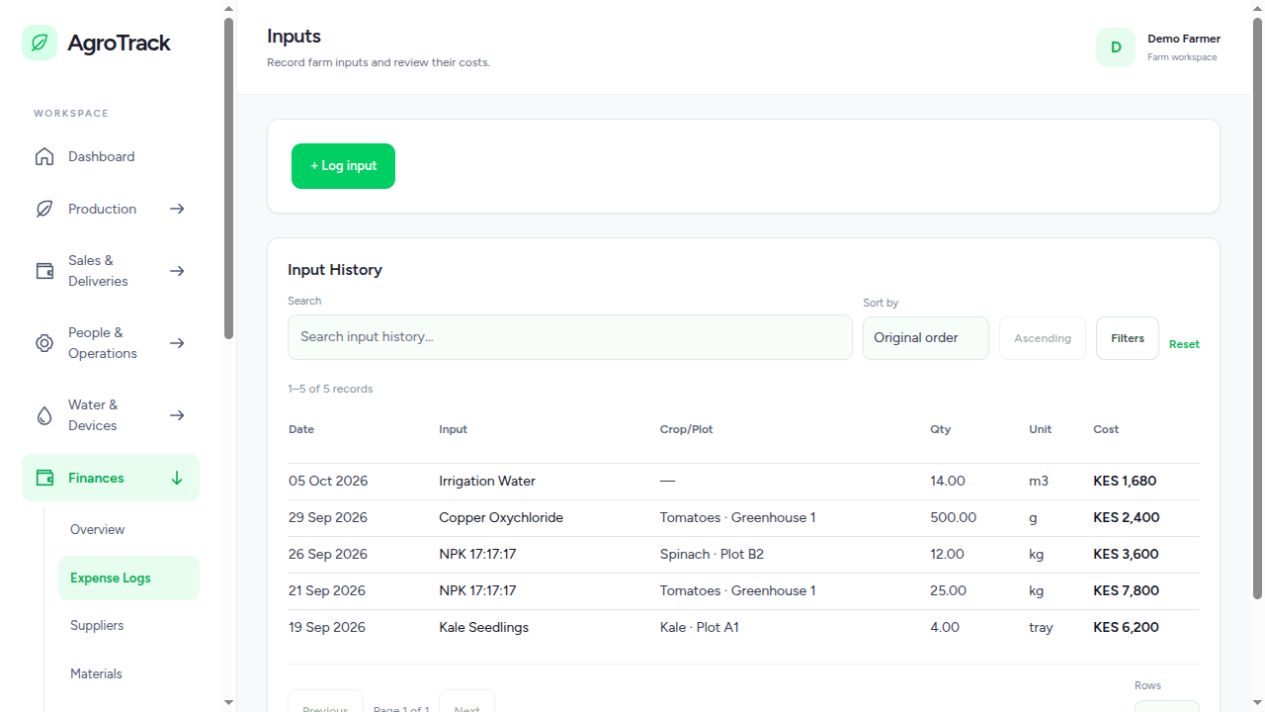
Log an input with its date, quantity, unit and cost. Link it to a crop or section where that relationship is known. A dated cost record is easier to check against a receipt than an end-of-month estimate, and it gives you a starting point for comparing plantings.
Work records and payments belong beside other farm costs. Manage workers separately from work logs and payments, and use production activities to capture start and stop times and observations. That helps you discuss what work was recorded and where effort was spent without relying entirely on attendance memory.
A purchase is not the same thing as using an input on a crop. The finance and inventory workflows support suppliers, materials, purchase records, input stock and production costing. Keeping those steps distinct makes the records more useful when checking what was bought, what remains and what was allocated to production.
Use the dashboard and reports to bring recorded costs, production and revenue information together. The quality of the result depends on the completeness of the entries: missing labor, unrecorded stock use or estimated yields still need attention. The system gives you records to review; it cannot recover a receipt that was never entered.
Yes. Finances includes worker records, work logs and payments alongside input expenses, purchases, stock and overhead costs.
No. Reports summarize recorded information. Complete cost and revenue entries, suitable allocations and review of estimates are needed for a useful assessment of the season.
Add your growing area, record an active crop and build from there.
Create your AgroTrack account Already have an account? Sign inYou are offline. Save field drafts in this tab and reconnect before submitting records or operating pumps.
In Safari, open Share and select Add to Home Screen.